Top 5 Note-Taking Apps and Digital Notebooks for Productivity
In today’s fast-paced digital world, finding the right note-taking tool can transform the way you capture, organize, and retrieve information. Whether you are a student, professional, or creative, having an app or device that blends ease of use with powerful features is essential for productivity. With countless options available, choosing the most reliable and user-friendly solutions can be overwhelming.
This guide highlights five of the most popular and top-rated note-taking platforms available on Amazon. These selections combine high user ratings, extensive reviews, and strong sales performance to ensure both quality and trustworthiness. From versatile Android-based tablets to minimalist E-Ink devices, each option is designed to suit different needs, whether you prefer handwriting, typing, or integrating AI-assisted features.
By exploring these devices, you can discover tools that not only store your notes but also enhance creativity, streamline workflow, and offer seamless cloud synchronization. Our selections emphasize functionality, durability, and user satisfaction, making it easier to invest in a note-taking solution that genuinely improves your daily organization.
Selection Criteria:
To ensure this guide reflects the best options for users, the following criteria were applied when selecting these note-taking devices:
-
User Ratings & Reviews: Only products with consistently high ratings and a substantial number of reviews on Amazon were considered, reflecting genuine user satisfaction and reliability.
-
Popularity & Sales: Top-selling devices with strong visibility on retail platforms were prioritized to highlight widely trusted solutions.
-
Functionality & Features: Devices were chosen based on a combination of core note-taking capabilities, including handwriting support, digital organization, annotation tools, AI features, and app ecosystem compatibility.
-
Versatility: Solutions that accommodate different workflows, such as reading, writing, diagramming, or AI-assisted tasks, were favored.
-
Durability & Build Quality: Consideration was given to long-term usability, battery life, and the overall physical quality of the device, ensuring they withstand regular use.
Overviews
Amazon Kindle Scribe


The Amazon Kindle Scribe is a large‑screen E‑Ink digital notebook and reader with a 10.2″ glare‑free display and an included battery‑free stylus. Designed to blend Amazon’s renowned reading experience with robust note‑taking tools, Scribe lets users write directly in notebooks, annotate PDFs, and capture ideas with a natural pen‑on‑paper feel. Its AI‑driven notebook features enable summarization and handwriting refinement, while the Kindle ecosystem offers deep integration with books and documents.
Pros
-
Natural writing experience: Users frequently praise how the stylus feels like writing on paper with minimal lag and no charging required.
-
Strong battery life: E‑Ink technology combined with Kindle’s efficiency yields weeks of use per charge, suitable for heavy note workloads.
-
Integrated document workflow: Users can import and annotate PDFs and mark up documents directly, which reviewers and buyers find highly practical.
-
AI notebook tools: Built‑in summarization and handwriting refinement simplify review and sharing of handwritten notes.
-
Large ecosystem: Seamless access to Amazon’s vast e‑book library and Kindle mobile apps is a major convenience.
Cons
-
Limited advanced note features: Compared to dedicated digital notebooks, Scribe’s note organization and productivity tools are basic, and exporting notes can be cumbersome.
-
Reading focus limits power: Some users report that true annotation flexibility (e.g., writing directly on reflowable text) is limited, with notes often tied to “sticky” interfaces rather than free ink.
-
Sub‑premium note‑tool set: Serious productivity users may prefer devices with deeper third‑party app support or native organizational features.
Amazon Kindle Scribe Colorsoft

The Kindle Scribe Colorsoft advances the standard Scribe experience with an 11″ color‑capable E‑Ink Colorsoft display and the same battery‑free Premium Pen. It combines paper‑like writing with the added utility of color annotations, multiple pen tools and high contrast, maintaining long battery life and Amazon ecosystem access.
Pros
-
Color note & drawing tools: Multiple pen colors, highlighters, and shading tools expand creative and organizational possibilities beyond black‑and‑white jotting.
-
Natural feel with responsive stylus: Similar to the standard Scribe, the pen feels intuitive and comfortable for extended writing sessions.
-
AI‑enhanced productivity: Features like summaries and handwriting conversion support deeper workflows.
-
Better visibility: Color improves clarity for diagrams, multi‑category notes, and organization‑oriented layouts.
Cons
-
Higher price point: Color and advanced hardware come with a premium cost compared to the standard model.
-
Still limited app ecosystem: Users focused on productivity beyond the Amazon note tools (e.g., Notion, OneNote) may find the system constrained.
-
Color E‑Ink limitations: Color saturation is softer than LCD/LED displays, which can hinder some graphic‑intensive use cases.
BOOX Tablet 10.3″ Note Air 5 C

The BOOX Note Air 5 C is a high‑end Android‑based color E‑Ink tablet with a 10.3″ Kaleido 3 display, 6 GB RAM, and 64 GB storage. Combining Android 15 with Google Play access, it functions as a versatile digital notebook, reader, and productivity device, supporting third‑party note‑taking apps alongside powerful native E‑Ink annotation tools and PDF features.
Pros
-
Android flexibility: Full access to Google Play enables installation of favorite note apps (OneNote, Notion, etc.) beyond the native suite.
-
Color E‑Ink display: Color support helps differentiate notes, diagrams, and reading material.
-
Powerful hardware: Octa‑core CPU and expandable storage mean smoother handling of large documents and multiple apps.
-
Front light & extra features: Adjustable lighting, speakers, and microphone broaden utility in varied lighting and use environments.
Cons
-
Learning curve: Reviews note that Android on E‑Ink can feel unfamiliar, and some navigation tasks are less intuitive than dedicated writers.
-
Darker color performance: E‑Ink color tends to be muted compared with LCD/LED tablets, affecting vibrancy.
-
Weight & size: Slightly heavier than simpler dedicated notebooks, which can matter for extended hand‑held use.
iFLYTEK AINOTE Air 2 8.2″ AI Note‑Taking E‑Ink Tablet
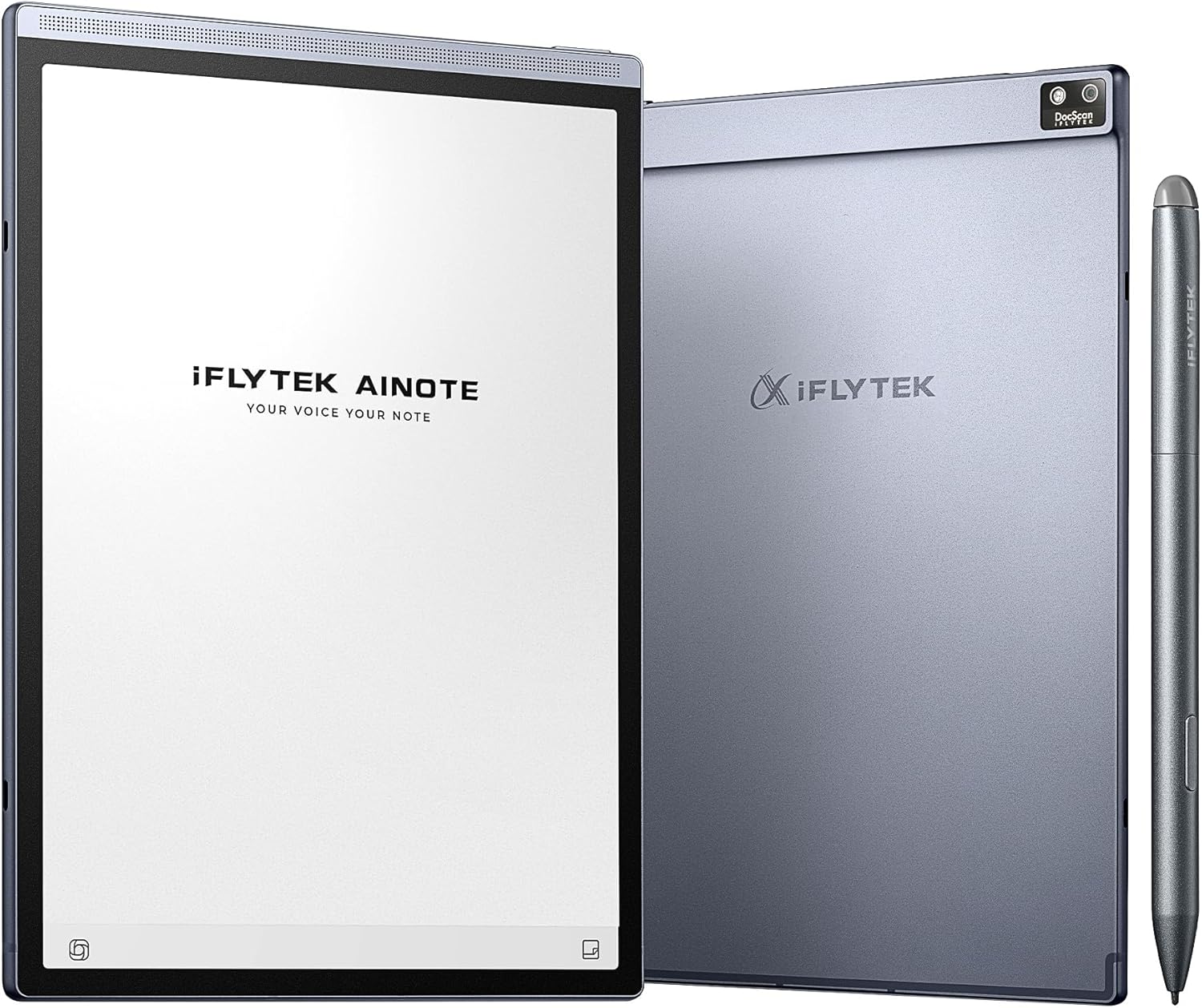
The iFLYTEK AINOTE Air 2 is a compact 8.2″ E‑Ink AI‑enhanced note‑taking device that supports voice‑to‑text transcription, multi‑language tools, and cloud sync. With 24 front‑light levels and OCR scanning, it’s positioned as a versatile digital notebook for meetings, study sessions, and portable workflows.
Pros
-
AI transcription & multi‑language support: Converts spoken content to text and supports multiple languages, which reviewers highlight for meeting and lecture use.
-
Big storage & battery life: 32 GB onboard plus cloud sync ensures ample space and up to a week of battery life.
-
OCR document scanning: Built‑in camera and scanning tools make it easy to digitize paper content.
-
Eye‑friendly display: E‑Ink plus adjustable warm/cool front lights ease long writing/reading sessions.
Cons
-
Less powerful UI: Some users report that the interface and responsiveness are simpler than premium alternatives.
-
Limited third‑party app support: Unlike Android‑based competitors, app flexibility is constrained to built‑in tools.
reMarkable 2 10.3″ Digital Paper Tablet

The reMarkable 2 is a minimalist digital notebook with a 10.3″ E‑Ink paper‑like display and precise stylus. It prioritizes distraction‑free writing and note organization with multiple templates, handwriting‑to‑text conversion, and cloud wiki services. Reviewers consistently praise its very natural writing feel and focus‑oriented design.
Pros
-
Paper‑like writing experience: Many reviewers describe the stylus and screen interaction as closest to real paper.
-
Long battery and simplicity: E‑Ink efficiency gives up to ~2 weeks of battery life, and the focused toolset avoids unnecessary clutter.
-
Good organization: Users appreciate intuitive notebooks and tagging for personal and work notes.
Cons
-
No backlight: E‑Ink without lighting makes low‑light use more challenging.
-
Limited ecosystem: Integration is largely via its own cloud services; search and external app support are less robust than Android tablets.
-
Higher price: Premium hardware and simplicity come with a cost that some buyers find hard to justify.