Best MIDI Keyboard Controllers for Modern Music Production
MIDI keyboard controllers have become essential tools for producers, composers, and performers working in digital music environments. They bridge the gap between creative ideas and software-based instruments, offering tactile control over sound design, sequencing, and arrangement. Whether used in a home studio, a professional production setup, or a mobile workflow, a well-chosen MIDI controller can significantly improve efficiency and musical expression.
The controllers featured in this guide were selected to represent a balance between functionality, usability, and value. They cater to a range of production needs, from compact, portable keyboards suited for beat-making and travel, to larger controllers designed for more expressive playing and advanced DAW control. All selected models are widely used, well-reviewed, and compatible with major music production software, making them reliable choices for both emerging and experienced musicians.
Criteria Used to Select These MIDI Keyboards
-
User Ratings and Popularity Each MIDI controller in this guide was chosen based on strong user ratings, high review counts, and consistent popularity on Amazon. Products with widespread positive feedback from both beginners and experienced musicians were prioritized to ensure real-world satisfaction and reliability.
-
Build Quality and Key Action Playability was a major factor. Controllers were evaluated for key feel (velocity sensitivity, key size), overall build durability, and quality of pads/controls. Models with responsive keys and solid construction are more enjoyable and expressive to play over time.
-
Feature Set and Performance Tools A useful controller should go beyond basic keys. We looked for features such as drum pads, assignable knobs/sliders, built-in arpeggiators, OLED displays, semitone transpose, and other performance-enhancing tools that expand creative workflow without requiring additional gear.
-
DAW Integration and Software Compatibility Seamless integration with major DAWs (Ableton Live, Logic Pro, FL Studio, etc.) and flexible mapping were essential. Controllers that include dedicated transport controls, presets, and compatibility with popular music software improve productivity and reduce setup complexity.
-
Value for Money We weighed the balance between price and practical utility. The selected controllers offer strong functionality and inclusive software bundles relative to their cost, ensuring that users get meaningful features and creative potential without overspending.
Overviews
Akai Professional MPK Mini MK3 – 25-Key USB MIDI Keyboard Controller
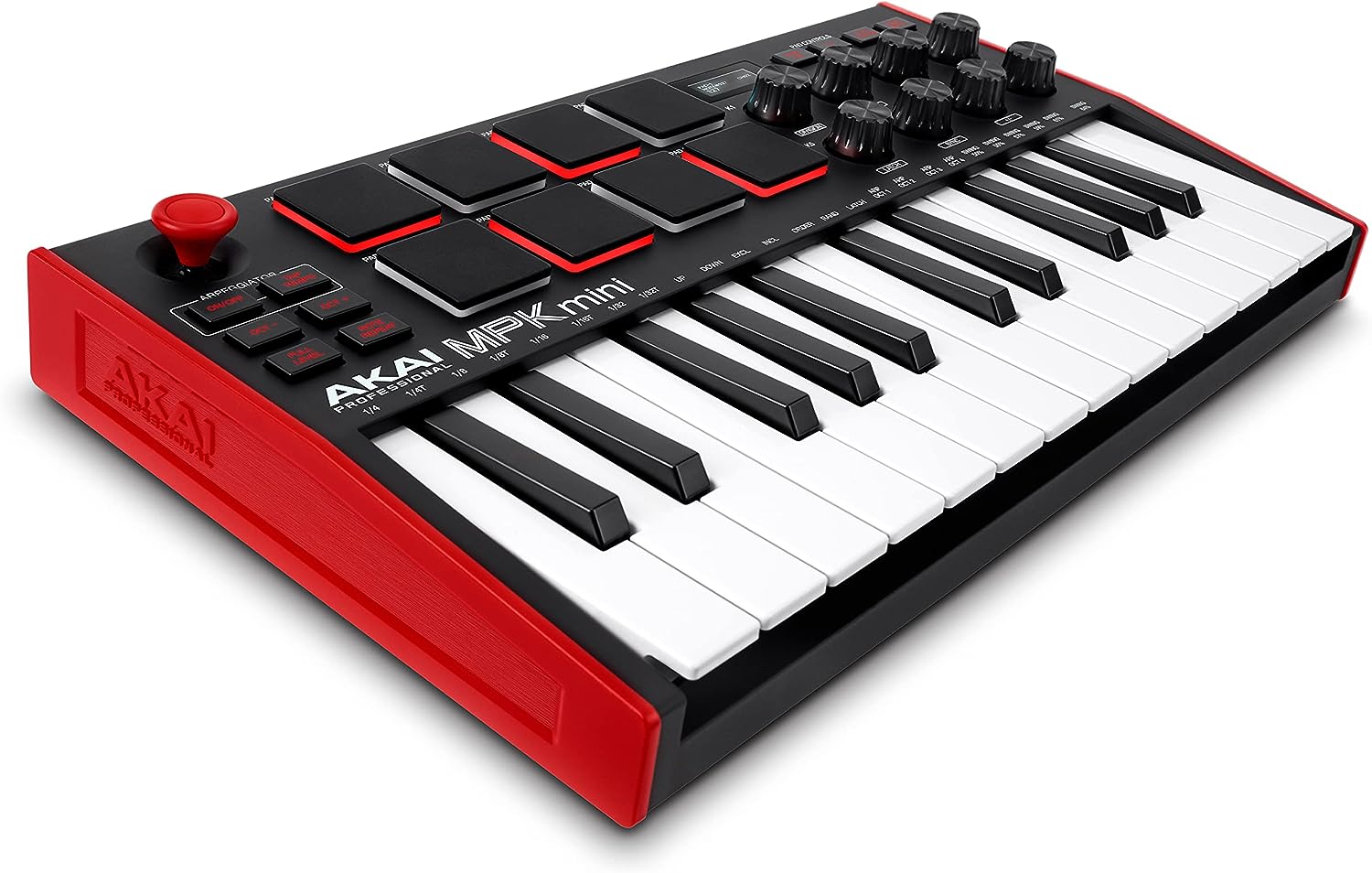

A perennial best-selling compact MIDI controller, the Akai Professional MPK Mini MK3 combines a 25-key velocity-sensitive keyboard with eight backlit MPC-style pads, eight assignable knobs, and a four-way joystick for pitch and modulation control. It is USB-bus powered and widely bundled with virtual instruments and production software, making it a strong choice for beat-making, composing, and mobile music production.
Pros
-
Highly portable and beginner-friendly: Its small footprint and USB power make this controller easy to integrate with laptops and tablets. Great pick for beginners or producers with limited desk space.
-
Feature-rich for the size: Drum pads and assignable knobs let you control DAW functions and trigger samples without extra hardware.
-
Strong software bundle: Often includes production tools and virtual instruments with purchase, adding immediate creative utility.
Cons
-
Mini keys may not suit all players: The compact key size is not ideal for pianists or those used to full-size keys.
-
Limited control surface: Compared with larger controllers, fewer faders/controls can limit hands-on mixing and performance tweaks.
Novation Launchkey MK4 – MIDI Keyboard Controller

The Novation Launchkey MK4 series is one of the most popular multi-key controllers for modern DAW workflows, particularly with Ableton Live. It pairs velocity-sensitive keys with pads, encoders, and deep software integration, offering broader creative scope than many entry-level controllers.
Pros
-
Excellent DAW integration: Especially strong with Ableton (but also compatible with Logic, FL Studio, and others), reducing setup time and enhancing performance control.
-
Expanded creative features: Innovative arpeggiator, chord/mode options, and extensive mapping help spark ideas.
-
Scalable key options: Available in multiple key counts (25–61) to suit different playing preferences.
Cons
-
Build quality reflects moderate price point: Mostly plastic construction and semi-weighted keys may feel less premium.
-
Control layout can be dense: A broad feature set means a learning curve for new users.
Senfot 49 Key MIDI Keyboard Controller with OLED Display & DAW Integration

A versatile 49-key USB MIDI keyboard controller designed for studio and live music production, the Senfot model features velocity-responsive standard-sized keys, an intuitive OLED display, and built-in DAW integration that allows hands-on control over transport and workflow. This controller includes eight velocity-sensitive drum pads, semitone transposition, ARP auto-accompaniment, and comprehensive velocity control, making it suitable for composing, sequencing, beat-making, and performance. The OLED screen provides real-time feedback for settings, while the unit’s wide software compatibility extends across macOS, Windows, and iOS devices, enabling seamless connection to major digital audio workstations.
Pros
-
Full-sized expressive keys: Offers natural feeling playability with good dynamic range, capturing subtle nuances in performance more akin to a traditional keyboard rather than mini keys.
-
OLED display for live feedback: The integrated OLED panel delivers clear visual readout of parameters and settings, helping you monitor transposition, modes, and other functions without relying strictly on your computer screen.
-
Rich feature set at budget price: Alongside standard DAW control, this keyboard includes ARP auto-accompaniment, semitone transpose, and eight velocity pads—features often found on higher-priced controllers—making it versatile for production and performance.
-
Broad DAW and device compatibility: Compatible with macOS, Windows, and iOS, the controller connects easily via USB, and its DAW integration supports intuitive control over many workflows.
Cons
-
-
Brand recognition and long-term reliability: Senfot is a less established brand compared with major MIDI controller manufacturers, so long-term durability and customer support may not match premium alternatives.
-
Limited professional-grade controls: While the feature set is strong for the price, this controller lacks advanced hardware controls (like motorized faders, assignable knobs beyond pads) found on higher-end units, potentially limiting deep DAW manipulation.
-
-
Documentation and community resources: User guides and online support materials are often less comprehensive than those for mainstream brands, which can make setup or troubleshooting slightly more challenging for beginners.
M-Audio Keystation 49 MK3 – 49-Key MIDI Keyboard Controller

The M-Audio Keystation 49 MK3 is a straightforward, piano-like MIDI controller with 49 velocity-sensitive keys, pitch/mod wheels, and essential DAW transport buttons. It is designed for musicians who want a natural playing experience without lots of extraneous controls.
Pros
-
Natural keyboard feel: Larger key bed makes it more comfortable for expressive playing and chord work.
-
Simple, intuitive layout: Focused on essential performance and DAW control without overwhelming extras.
-
Software included: Often bundles virtual instruments and production tools, boosting out-of-the-box value.
Cons
-
Limited dedicated controls: Fewer pads/knobs than competitors mean less hands-on DAW manipulation.
-
No aftertouch or advanced features: Basic feature set may feel underwhelming for seasoned producers.
Arturia MiniLab 3 – Universal MIDI Controller for Music Production

A highly rated and widely purchased compact MIDI controller, the Arturia MiniLab 3 Champagne Edition combines a 25-note velocity-sensitive slim keyboard with 8 pressure-sensitive RGB performance pads, 8 rotary encoders, and 4 sliders, making it a versatile tool for music creation and DAW control. Its intuitive controls, built-in arpeggiator, and deep integration with major digital audio workstations let users produce, edit, and perform with ease. The controller also includes a comprehensive software package with production tools and sounds, and it supports USB-C and traditional MIDI connectivity for flexible setup across Mac and Windows platforms.
Pros
-
Rich control set in a compact design: Offers velocity-sensitive keys, extensive pad banks, multiple encoders and sliders, and dedicated DAW transport functions, giving a lot of hands-on control for production and performance in one compact unit.
-
Deep DAW and software integration: Custom DAW scripts and controller mappings for Ableton Live, Logic Pro, FL Studio, and more streamline workflows and reduce setup time.
-
Included software suite: Bundled tools like Ableton Live Lite and Analog Lab Intro (with over 500 synth/keyboard sounds) allow immediate creative use without additional purchases.
-
Portable and well-built: Lightweight and USB bus-powered design makes it ideal for mobile setups, small desks, or travel, while maintaining sturdy construction and eco-friendly materials.
Cons
-
Limited key range: With only 25 keys, it can feel restrictive for full-range playing or complex compositions, often requiring frequent octave shifting.
-
Pads and controls may feel stiff: Some users report that pads are firmer than expected and can feel less responsive for finger drumming or expressive triggering.
-
Mini keys may not satisfy traditional pianists: The slim key format isn’t ideal for those accustomed to full-sized keyboard action, which can impact performance comfort for detailed playing.
-
Learning curve for advanced mapping: While DAW integration is strong, customizing controls beyond default behavior can require additional mapping and MIDI software knowledge.