Top Ergonomic Keyboards for Comfortable, Healthier Everyday Typing
Choosing the right ergonomic keyboard can make a major difference in daily comfort, productivity, and long-term wrist health. Whether you work from home, spend long hours coding, or simply want to reduce fatigue while typing, an ergonomically designed keyboard helps maintain a more natural hand, wrist, and forearm position.
The models featured in this guide represent some of the most trusted, well-reviewed options on the market. They offer varying levels of ergonomic support — from gentle curved layouts to fully sculpted, split mechanical designs. This means there’s a suitable choice whether you’re a casual typist, a student, or someone who types all day for work.
By comparing features like layout shape, key feel, adjustability, build quality, and real-world user feedback, this guide will help you find a keyboard that fits your needs, budget, and typing style. Investing in a good ergonomic keyboard isn’t just about comfort — it’s about preventing strain and supporting healthier long-term typing habits.
How We Selected These Keyboards
To choose the five keyboards in this guide, we focused on:
-
Ergonomic Design: Split layouts, curved keyframes, wrist rests, and tenting features that promote neutral wrist alignment.
-
User Experience: Thousands of reviews, high ratings, and consistent praise for comfort and reduced strain.
-
Typing Feel: Options covering membrane and mechanical switches to suit different preferences and workloads.
-
Build Quality & Reliability: Strong materials, stable frames, and proven long-term durability.
-
Value & Availability: Products that offer strong performance for their price and are widely available on Amazon.
Overviews
Logitech ERGO K860 Wireless Ergonomic Keyboard


The Logitech ERGO K860 is a well-regarded full-size ergonomic keyboard designed to reduce wrist and forearm strain during long typing sessions. It features a curved, “wave-like” key layout, an integrated cushioned wrist rest, and adjustable tilt legs — aiding a more natural hand posture compared with standard keyboards.
Pros
-
Superior ergonomic design: The curved, split-style key layout helps align wrists and forearms in a neutral position. Combined with the padded, memory-foam wrist rest, many users report noticeable reductions in wrist/forearm fatigue, especially after extended typing.
-
Full-size layout with numpad & multi-device support: Users benefit from a standard keyboard layout (including number pad) while gaining ergonomic advantages — practical for work, spreadsheets, coding, or writing.
-
Quiet, comfortable key feel: The keys are light and quiet, which helps in shared workspaces. The “PerfectStroke” key design is often praised for fluid, fatigue-free typing.
Cons
-
No backlighting: For users who work in low-light or dim environments, the lack of backlit keys can be a drawback.
-
Some learning curve: Because the layout differs from a standard straight keyboard, it may take a day or two to adjust — especially if switching from a traditional keyboard.
-
Bulkier footprint: The ergonomic shape, integrated wrist rest, and full-size frame take more desk space than a compact keyboard.
Kinesis Advantage2 Ergonomic Keyboard (KB600)

The Kinesis Advantage2 is a unique contoured mechanical keyboard built for serious ergonomic benefits — with split concave key wells, thumb clusters, and angled layout to encourage optimal hand, wrist, and forearm positioning. It targets heavy typists or users prone to repetitive strain issues.
Pros
-
Exceptional ergonomic shaping: The concave key wells, integrated palm supports, and tented layout substantially reduce wrist extension and muscle strain, supporting more natural posture for hands and arms.
-
Mechanical switches & premium typing feel: Using genuine mechanical switches, the keyboard delivers crisp, responsive keypresses preferred by programmers, writers, and heavy typists. Some users find typing comfort and precision far superior to standard keyboards.
-
Highly customizable: On-board programmability, macro support, and compatibility with multiple layouts (e.g. QWERTY, Dvorak) make it flexible for power users who tailor their workflow.
Cons
-
Steep learning curve: The non-traditional layout and key-well design require time to adjust; initial typing speed often drops until the user adapts.
-
Compact but unusual layout: The unconventional arrangement (especially thumb clusters) may feel awkward for users accustomed to standard key placement.
-
Lack of numpad (in some versions) and larger desk footprint: Some users needing a full number pad may find it limiting; even compact versions tend to be wider or shaped differently from standard keyboards.
Microsoft Sculpt Ergonomic Keyboard
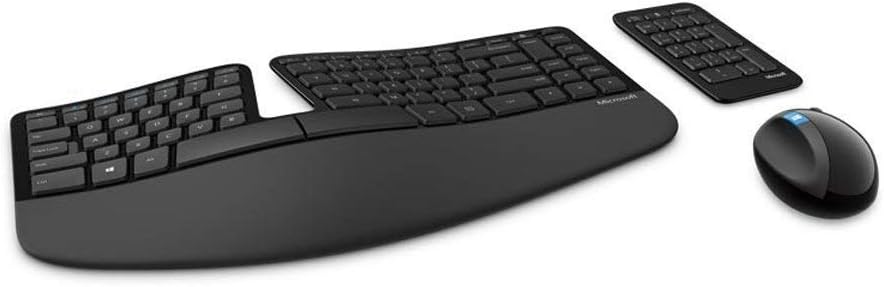
The Microsoft Sculpt Ergonomic Keyboard is a mid-range ergonomic option that emphasizes comfort and natural typing posture for office and home users. It uses a domed, split layout with a cushioned palm rest and promotes reduced strain for people typing many hours per day.
Pros
-
Natural hand positioning: The split layout and slight tenting help keep wrists straight and reduce inward bending of hands, contributing to decreased wrist/forearm stress over long periods.
-
Comfortable wrist/palm support: A padded palm rest adds cushioning, which many reviewers say improves comfort and lessens fatigue compared with flat keyboards.
-
Good for everyday typing: For general office work, email, writing, browsing — it provides ergonomic benefit without being overly complex or demanding like fully split mechanical boards.
Cons
-
Less suited to power typists / programmers: Compared with mechanical ergonomic keyboards, the typing feel is softer and less precise, which some heavier users or developers may find less satisfying.
-
Plastic build, less “premium” feel: The materials and key action tend to feel less robust compared with more expensive mechanical ergonomic boards.
-
Limited customization: Fewer programmability and layout options compared to advanced ergonomic keyboards like the Kinesis or mechanical split designs.
Kensington Pro Fit Ergonomic Wireless Keyboard KB675
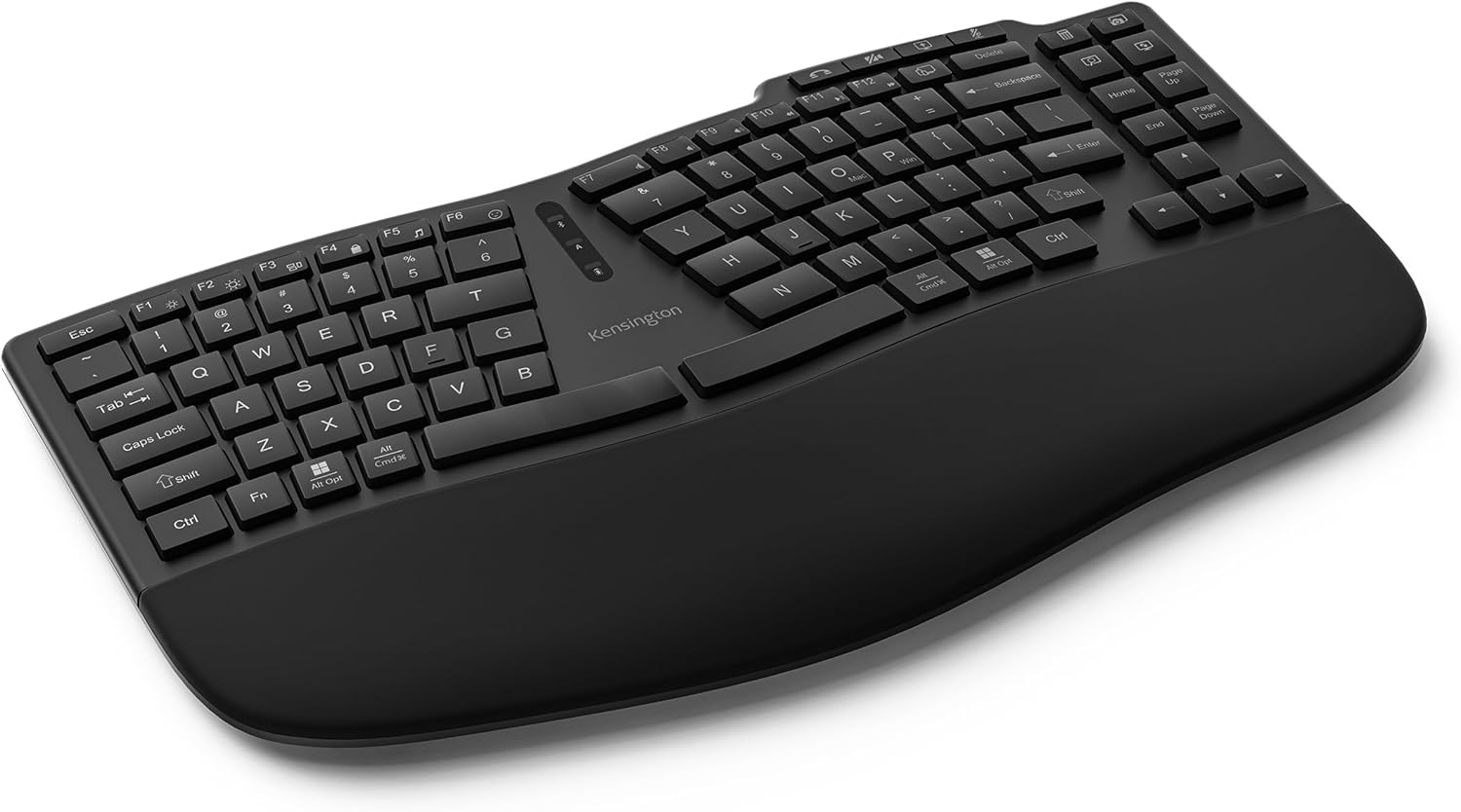
The Kensington Pro Fit Ergonomic Wireless Keyboard (KB675) offers ergonomic design at an affordable price. It aims to provide essential comfort and wrist support for office and home users, while using a curved and slightly tilted layout with built-in wrist support.
Pros
-
Good ergonomic basics at low cost: The curved/split keyframe plus reverse tilt and wrist rest help reduce strain in hands and wrists compared to a standard flat keyboard.
-
Quiet, spill-resistant keys: The keyboard often receives praise for quiet typing and spill-resistant key design — useful for everyday office or home environments.
-
Wireless convenience: Its wireless connectivity (usually 2.4 GHz) frees up desk space and avoids cable clutter, which some users find useful for flexible setup.
Cons
-
Basic typing feel: As a membrane keyboard (not mechanical), the typing feedback is softer and less satisfying than mechanical ergonomic options — less ideal for heavy typists or those who prefer crisp keypresses.
-
Limited features & longevity: Compared to premium ergonomic keyboards, it lacks advanced adjustability, programmability, and may feel less durable over long-term daily heavy usage.
-
No high-end ergonomic shaping: It offers ergonomic improvements over standard keyboards, but doesn’t match the contouring, tenting, or advanced support seen in split or mechanical ergonomic boards.
Logitech Wave Keys Keyboard

The Logitech Wave Keys Keyboard brings ergonomic comfort in a full-size layout, offering a gentle curved keywave and built-in palm rest — making it a good entry-level upgrade for users seeking better wrist posture without diving into split or mechanical keyboards.
Pros
-
Improved wrist alignment: The subtle wave-shaped layout and curved keys guide hands into a more relaxed posture than a flat keyboard, reducing tension during typing.
-
Familiar layout with ergonomic benefit: Because it retains a standard full-size layout (including numpad) yet adds ergonomic shaping, it is easy to adopt for general productivity, writing, or office tasks.
-
Good balance of comfort and cost: For users who want ergonomic improvement without spending much, it represents a reasonable middle ground between basic and premium ergonomic boards.
Cons
-
Limited ergonomic improvement: The ergonomic benefits are modest; for heavy typists or those suffering wrist strain, results may be marginal compared with split or mechanical ergonomic keyboards.
-
Not tailored to heavy daily use: While fine for occasional or moderate typing, it may not offer enough support for programmers, writers, or anyone typing many hours every day.
-
Some compromise on advanced typing feel: As a non-mechanical board with standard keys, the typing feedback is less crisp than mechanical alternatives — less appealing to users who prefer precision or tactile feedback.