
Top Home NAS Devices: High-Performance and Reliable Storage Solutions
In today’s digital age, having a reliable home NAS (Network Attached Storage) device has become essential for centralized file storage, seamless backups, and media streaming. Whether you’re storing photos, videos, documents, or managing a home office network, a quality NAS ensures your data is accessible, secure, and efficiently organized. The growing variety of NAS options on the market can make choosing the right model challenging, especially for users seeking a balance between performance, ease of use, and future expandability.
This guide focuses on top-rated NAS devices currently available on Amazon, selected based on popularity, performance, and user satisfaction. Each device highlighted combines reliable hardware with capable software ecosystems to handle everyday tasks such as file sharing, automated backups, remote access, and media serving. From entry-level two-bay models to high-performance four-bay systems, these NAS units cater to a wide range of home use scenarios, ensuring that users can find a solution that fits both their technical requirements and budget.
By reviewing these NAS devices, this guide aims to help readers make informed decisions without compromising on reliability, speed, or convenience.
Criteria for Choosing These NAS Devices
-
User Ratings and Reviews: Devices were selected based on high ratings and substantial feedback from Amazon users and tech enthusiasts, reflecting real-world satisfaction.
-
Performance & Hardware: Priority was given to models with powerful CPUs, sufficient RAM, and fast network connectivity to support multi-user access, media streaming, and backups efficiently.
-
Ease of Use & Software Ecosystem: Systems with intuitive interfaces and robust OS platforms like Synology DSM, QNAP QTS, or TOS were preferred for ease of setup and app availability.
-
Flexibility & Expandability: Models with multiple drive bays, RAID support, and optional SSD caching allow future upgrades and adaptable storage configurations.
-
Reliability & Longevity: Devices known for consistent performance, stable operation, and solid hardware build were prioritized to ensure lasting value.
Overviews
Synology DiskStation DS224+ 2-Bay NAS
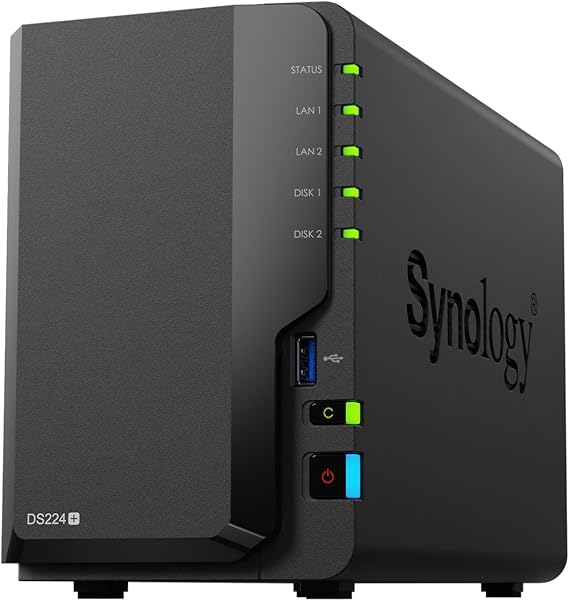

The Synology DiskStation DS224+ is a widely recommended home NAS that combines ease of use with capable performance thanks to its Intel Celeron J4125 quad-core processor and Synology’s DiskStation Manager (DSM) software. It supports two 3.5″ or 2.5″ drives (sold separately) for flexible RAID configurations, centralised backups, media serving, and remote file access. Its software ecosystem makes it especially appealing for users wanting a polished interface with broad app support for backups, multimedia, and remote access.
Pros
-
User-friendly OS & ecosystem: DSM is often praised for intuitive setup and powerful apps for backup, media streaming (e.g., Plex), photo management, and mobile access.
-
Reliable performance: Intel Celeron CPU and expandable RAM handle typical home tasks (backups, streaming, file sharing) without lag.
-
Active community & support: Strong third-party resources and tutorials make troubleshooting easier for new owners.
Cons
-
1 GbE networking: Lacks multi-gigabit Ethernet, so transfer speeds are capped at 1 Gb/s without link aggregation.
-
No M.2 slots: No native NVMe caching, limiting flexibility for performance-oriented users.
-
Diskless unit: Drives must be purchased separately, adding to total cost.
UGREEN NASync DXP4800 Plus 4-Bay Desktop NAS

The UGREEN NASync DXP4800 Plus is a newer entrant rapidly gaining traction for home NAS use with high storage ceilings (up to ~136 TB), 10 GbE networking, and an Intel Pentium Gold processor. Its combination of hardware power, dual network ports, and advanced features (including AI-powered photo album and remote access via app) makes it suitable for file backup, private cloud storage, media serving, and light containerised workloads.
Pros
-
High capacity flexibility: Four drive bays support large total storage, ideal for extensive photo libraries, video collections, and backups.
-
Fast networking: Includes both 2.5 GbE and 10 GbE ports for significantly higher data throughput than typical 1 GbE NAS units.
-
User-friendly remote access: Secure private cloud access and cross-platform app support simplify remote file access and syncing.
Cons
-
Software maturity: UGREEN’s NAS software ecosystem is less established than Synology or QNAP, with fewer advanced apps.
-
Drive purchase required: Like most diskless units, hard drives are not included.
-
Size & heat: Larger chassis and four active drives may generate more noise and require thoughtful placement. (General consensus from user feedback)
QNAP TS-464-8G-US 4-Bay NAS

The QNAP TS-464 is a more advanced home NAS with four bays, dual 2.5 GbE, M.2 SSD slots for caching, and 8 GB of RAM. It uses QNAP’s QTS operating system and supports a broad range of services including Plex media server, containerised apps, and virtual machines. This model appeals to power users who want both storage and a platform for network apps and services.
Pros
-
Expandable & powerful: Four bays and SSD caching provide ample capacity and performance for backups, media, and multi-user access.
-
Multi-gigabit networking: Dual 2.5 GbE offers faster file transfers than standard 1 GbE NAS devices.
-
Feature-rich OS: QTS includes advanced backup tools, media streaming support, and containerised services for diversified home server use.
Cons
-
Complexity: QTS has a steeper learning curve than competitor software for some home users.
-
Price: More expensive than basic 2-bay NAS units, especially once drives are added. (Common in user reviews compared to entry level units)
ASUSTOR AS5402T 2-Bay NAS

The ASUSTOR AS5402T is a 2-bay NAS geared toward home media enthusiasts, with dual 2.5 GbE, HDMI output for direct playback, and an Intel Celeron CPU. ASUSTOR’s ADM operating system offers apps for multimedia, backups, and remote access. It’s a strong choice for users who want both NAS storage and direct media server capabilities to a TV or monitor.
Pros
-
Media-centric features: HDMI output alongside NAS storage lets users run local media apps without a client device.
-
Improved network throughput: 2.5 GbE supports better local transfer speeds.
-
Solid hardware base: Intel Celeron processor handles everyday NAS tasks with room for multimedia use.
Cons
-
Less mature ecosystem: ADM has fewer third-party integrations than Synology DSM.
-
Drive purchase required: Like peers, drives are not included.
-
2-bay limitation: Only two slots limit total capacity compared with 4-bay units. (General user consensus)
TERRAMASTER F4‑424 Pro NAS Storage

The TERRAMASTER F4‑424 Pro NAS Storage is a high‑performance 4‑bay network‑attached storage enclosure designed for home and small business environments requiring significant processing power and flexible storage capabilities. It features an Intel Core i3‑N305 8‑core/8‑thread CPU, 32 GB DDR5 memory, dual 2.5 GbE Ethernet ports with link aggregation support, and dual M.2 NVMe SSD slots for caching or tiered storage acceleration. The unit supports a wide range of RAID configurations and offers accelerated file access throughput, robust backup tools, and noise‑reducing chassis design elements. Drives are not included and must be purchased separately.
Pros
-
Powerful Hardware for Intensive Tasks: The combination of an 8‑core Intel i3‑N305 processor and 32 GB of DDR5 RAM provides substantial processing headroom for multitasking, on‑NAS applications, and heavier workloads like media serving or multiple concurrent file transfers.
-
High‑Speed Networking: Dual 2.5 GbE ports support faster local network throughput than traditional 1 GbE NAS devices, and link aggregation can push combined bandwidth up to ~5 Gb/s for compatible network setups, improving performance for multi‑user file access.
-
Flexible Storage and Caching: With four 3.5″/2.5″ drive bays and two M.2 NVMe slots for SSD caching, the F4‑424 Pro lets users tailor storage performance and capacity to their needs, whether optimizing for speed or archival storage.
-
Convenient Installation: Features like tool‑free drive trays and side‑sliding NVMe access panels simplify hardware setup and maintenance.
-
Rich Data Protection Tools: Built‑in backup and snapshot tools help safeguard critical data through centralized backup, snapshot, and cloud sync options.
Cons
-
Software Ecosystem Limitations: Terramaster’s TOS operating system is less mature and feature‑rich than competitors like Synology DSM or QNAP QTS, which may limit user experience for certain media, backup, or advanced app workflows.
-
Lack of 10 GbE: While dual 2.5 GbE ports are a plus over standard gigabit, the absence of native 10 GbE restricts maximum throughput potential for high‑performance environments where such speeds are desired.
-
Mixed User Feedback on Stability: Some community feedback mentions occasional issues with responsiveness, setup challenges, or slower transfer rates under certain configurations, suggesting that user experience may vary and careful setup and tuning might be required.
-
Higher Price Without Drives: As a diskless unit with premium hardware, the total system cost rises significantly once NAS‑grade drives (HDD or SSD) are factored in.
-
Memory Over‑Specification: While 32 GB RAM is generous, some technical observers note this exceeds the CPU’s officially supported maximum, potentially limiting how much of that memory is fully utilized by the system.