Top 5 Best Webcams for Streaming and Video Calls
In today’s world of remote work, online learning, and content creation, having a reliable webcam is essential. A good webcam ensures clear video quality, smooth performance, and accurate color reproduction, enhancing communication and making your virtual presence more professional. Whether you are attending meetings, streaming, or recording content, choosing the right webcam can make a significant difference.
This guide highlights five of the most popular and top-rated webcams available on Amazon. Each model was selected based on user reviews, performance, and reliability. From high-end 4K webcams for professional creators to mid-range options for business and personal use, these selections cover a variety of needs and budgets.
We focus on webcams that deliver excellent image quality, responsive autofocus, good low-light performance, and clear audio. Additionally, we considered build quality, ease of use, and added features such as privacy shutters, adjustable field-of-view, or AI tracking. By reviewing these top webcams, you can make an informed decision on which device best suits your virtual communication needs.
Criteria for Choosing the Best Webcams:
-
Video Resolution and Frame Rate: High resolution (1080p, 2K, or 4K) ensures sharp video, while smooth frame rates (30–60 fps) provide fluid motion for streaming or meetings.
-
Low-Light Performance: Webcams that perform well in dim or uneven lighting were prioritized to reduce noise and maintain clarity in any environment.
-
Autofocus and Field-of-View: Reliable autofocus and adjustable FOV allow flexibility for both close-up headshots and wider scenes, ensuring the subject is always framed properly.
-
Audio Quality: Built-in microphones were evaluated for clarity and noise reduction, though external microphones may still be preferred for professional setups.
-
Build and Usability: Durable mounts, compatibility with multiple devices, and ease of setup were key factors in making these webcams practical for daily use.
-
Additional Features: Features like privacy shutters, HDR support, AI tracking, and software enhancements were considered to enhance usability and performance.
-
User Feedback: Products were selected based on high ratings, large numbers of verified reviews, and positive feedback from Amazon users and social media communities.
Overviews
Logitech HD Pro Webcam C920


The Logitech C920 is arguably the benchmark full‑HD webcam: it offers 1080p video at 30 fps, dual stereo mics, and H.264 video compression to reduce strain on your CPU. Its five-element glass lens and accurate autofocus deliver very good clarity, while its durable clip mount works on most monitors and laptops. It’s broadly compatible and highly trusted for video calls, streaming, and content creation.
Pros
-
Excellent Image Quality: Its 1080p capture is sharp and color-accurate, especially under good lighting, making it a favorite for professional-style video calls.
-
Efficient Encoding: With H.264 compression, it offloads work from the CPU, improving performance during long calls or recordings.
-
Good Audio: Dual mics handle stereo sound reasonably well and help reduce background noise.
-
Build and Mounting: The strong clip-on mount fits a variety of displays, and it has a tripod thread for flexible setup.
-
Long Track Record: This model is widely reviewed and trusted, with many users praising its longevity and reliability.
Cons
-
Limited Frame Rate: Only supports 30 fps at 1080p, which may not be ideal for fast-motion streaming.
-
Lighting Dependent: The image quality can suffer in low light; you’ll often need good external lighting for optimal performance.
-
No Privacy Shutter: Unlike some newer webcams, it doesn’t come with a built-in cover, so you may want to buy one separately.
-
Aged Design: While still great, its build and sensor are from an older generation — newer models may offer improvements in dynamic range or low-light handling.
Razer Kiyo Pro Ultra (4K)

The Razer Kiyo Pro Ultra is a premium webcam designed for creators, featuring a large 1/1.2″ Sony STARVIS 2 sensor, an f/1.7 aperture lens, and 4K video capture. It supports HDR and delivers excellent image quality even in challenging lighting, making it ideal for high-end streaming, content creation, or professional conferencing.
Pros
-
Outstanding Low-Light Performance: The large sensor and wide aperture gather more light than typical webcams, producing rich, clean images in dim environments.
-
High Resolution: 4K capture provides very fine detail and allows for cropping or zooming in post-production without losing quality.
-
Professional-Grade Optics: The sensor and lens give a more “DSLR-like” feel, appealing to serious creators.
-
HDR Support: Helps maintain detail in both shadows and highlights, resulting in more balanced exposure.
-
Solid Build: Feels premium and mounts securely, so it’s stable during long sessions.
Cons
-
High Price: It’s significantly more expensive than standard 1080p webcams, putting it out of reach for many casual users.
-
Bandwidth Demands: 4K data requires more bandwidth and USB capacity; may tax older computers.
-
Limited Frame Rate at 4K: The 4K mode may be capped (e.g., 30fps), which could limit use in fast-motion video.
-
Software Dependency: To take full advantage, you may need to use Razer’s software; some features may not work well without it.
Insta360 Link 2 (4K with AI Tracking)
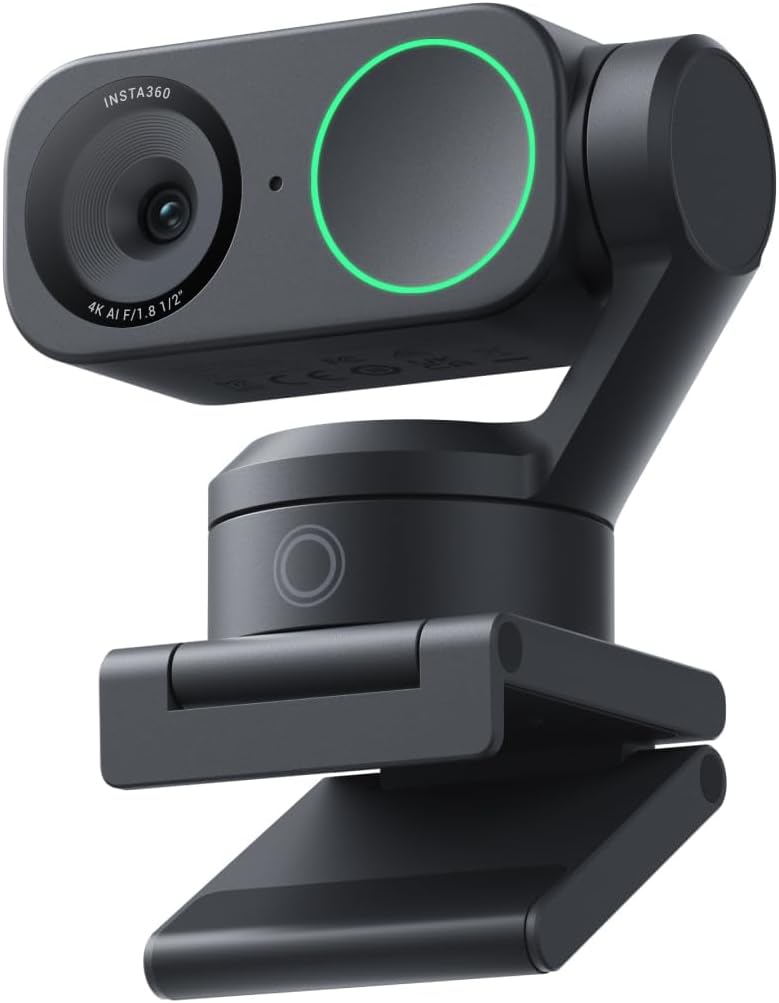
The Insta360 Link 2 is a highly advanced 4K webcam with a 1/2″ sensor, AI-based tracking, and a two‑axis motorized gimbal that allows the camera to follow your movements. It supports gesture control, auto‑zoom/framing, and has an AI noise-canceling mic — ideal for streamers, educators, and professionals who move while presenting.
Pros
-
AI Tracking and Gimbal: The motorized mount keeps the subject centered without manual adjustments, enabling dynamic presentations.
-
4K Ultra HD: Delivers sharp, detailed video with a wide dynamic range.
-
Gesture Controls: Users can control framing with hand gestures, making it more interactive.
-
Good Low-Light Performance: The relatively large sensor helps maintain image quality in dimmer environments.
-
Flexible Mounting: Magnetic mount and tripod compatibility give flexibility in positioning.
Cons
-
Heavier and Bigger: The gimbal mechanism makes it more bulky than fixed webcams.
-
Power and Bandwidth: The motorized tracking may demand more from USB bandwidth and power.
-
Cost: More expensive than standard webcams due to advanced hardware.
-
Software Ecosystem: To use all tracking and gesture features, you must rely on Insta360’s companion software, which may have a learning curve.
Anker PowerConf C200 (2K)

The Anker PowerConf C200 is a mid‑range webcam that offers 1440p (2K) resolution, an adjustable field-of-view (65°, 78°, 95°), and a privacy shutter. It’s designed for business users and remote workers who want better-than-720p quality without splurging on 4K. Its compact build and solid performance make it a versatile pick for meetings, teaching, and general use.
Pros
-
Higher-than-HD Resolution: 2K gives noticeably sharper video than typical 1080p webcams, especially on large displays.
-
Flexible Field-of-View: The adjustable FOV lets you choose between tight headshots or a broader scene.
-
Privacy Cover: Built-in shutter adds peace of mind when the camera is not in use.
-
Good Low-Light: Performs well in moderate lighting conditions, better than many budget cams.
-
Warranty & Support: Often comes with 18-month warranty, boosting confidence in its build quality.
Cons
-
Limited Frame Rate: Likely capped around 30 fps, so not ideal for smooth motion or high-speed content.
-
Software Required for Full Features: To adjust FOV and other settings, you need Anker’s software; plug‑and‑play usage is more limited.
-
Mic Quality: Built-in mic is serviceable but not studio-grade; external mic recommended for high-quality audio.
-
No 60 fps Option: For streaming or fast action, lack of higher frame rate could be a drawback.
Logitech Brio 4K Webcam

The Logitech Brio 4K is a premium webcam offering ultra‑high‑definition (UHD) video capture, featuring a glass lens, multiple field-of-view (FOV) options (65°, 78°, 90°), HDR (via RightLight 3), and a 5× digital zoom. It supports up to 4K resolution and leverages dual omni-directional microphones for clear audio. The camera can connect via USB-A or USB-C and includes a detachable universal mounting clip and tripod thread for flexible placement.
Pros
-
High-Resolution Video: The Brio delivers 4K resolution (up to 4096 × 2160) according to the official Logitech specs, producing very sharp, detailed video.
-
Multiple Field‑of‑View Options: You can switch between three diagonal FOV settings—65°, 78°, or 90°—to frame your shots more tightly or more broadly, depending on the use case.
-
RightLight 3 with HDR: The webcam automatically adapts to various lighting conditions, from dim rooms to bright backlit environments, delivering balanced exposure and good dynamic range.
-
Flexible Mounting: The detachable clip works on laptops or monitors, and there is also a standard ¼‑inch tripod thread for more advanced setups.
Cons
-
USB Bandwidth Requirement: To actually use 4K resolution, the Brio requires a high-bandwidth USB (USB 3.0 or better).
-
Software & Configuration Complexity: Some users note that you need to configure the webcam manually (via Logi Tune, G Hub, or other software) to unlock all features like FOV, white balance, or 4K — otherwise defaults may not be optimal.
-
Low-Light Limitations Without Lighting: While RightLight 3 and HDR help, the Brio still performs best with good lighting; in darker environments, image noise and graininess may be noticeable.
-
Power and Resource Demands: Higher resolution and frame rates can put a strain on system resources (CPU, USB throughput), potentially leading to issues if the host machine is not very powerful.